A PDF containing images can become surprisingly large, even when the document itself looks fairly simple.
One common reason is image resolution. People often insert photographs directly from cameras or phones without considering how many pixels the final document actually needs.
To understand the effect, we tested four synthetic photo-like images at different resolutions and exported each into a PDF. The tests used synthetic sample files and local encoding, using the same techniques as browser-side tools. No user data was involved.
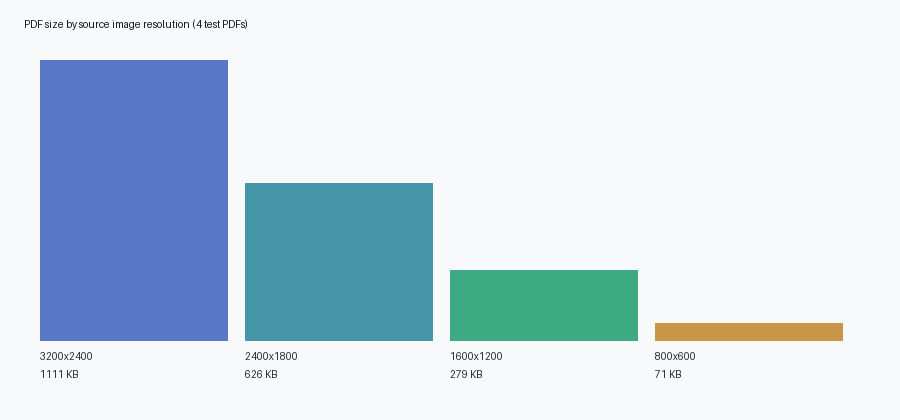
The resolution comparison
The highest-resolution sample was 3200×2400 pixels. Its resulting PDF measured 1,111 KB. Reducing the resolution to 2400×1800 brought the PDF down to 626 KB. At 1600×1200, the PDF measured 279 KB. The smallest sample, 800×600, produced a 71 KB PDF.
That's a reduction of approximately 94% between the highest and lowest resolution samples. The document did not need a complicated layout or dozens of pages to demonstrate the difference. The image dimensions alone made a noticeable impact.
| Image resolution | PDF size |
|---|---|
| 3200×2400 | 1,111 KB |
| 2400×1800 | 626 KB |
| 1600×1200 | 279 KB |
| 800×600 | 71 KB |
Why does resolution matter?
An image contains pixels, and more pixels generally mean more information to encode. A 3200×2400 image contains 7.68 million pixels. An 800×600 image contains just 480,000. That's sixteen times fewer pixels.
The final file size does not necessarily shrink by exactly the same ratio because compression, image content, encoding settings, and PDF structure all influence the result. Still, the relationship is worth paying attention to.
Does smaller always mean better?
No. A document that looks perfectly readable on a laptop might become blurry when printed. The correct resolution depends on the intended use.
For documents mainly viewed on screens, 1200–1600 pixels on the longest side can be a reasonable starting point for many ordinary images. For printing, particularly when images occupy large areas, higher resolution may be necessary. Scanned text also deserves extra care: reducing resolution too aggressively can make small characters difficult to read.
A practical workflow
Before exporting a PDF, check the dimensions of its source images. Remove unnecessary oversized images, resize photographs to their actual display requirements, and avoid repeatedly converting the same image through multiple formats.
If the document contains a mixture of text and photographs, inspect both after export. A smaller PDF is not useful if its text or images have become difficult to read.
You can work with PDF and image files using Pocket PDF: https://www.pocketpdf.site.
The main takeaway is simple: don't wait until a PDF becomes enormous to think about image resolution. The easiest size reduction often happens before the PDF is created.