Image compression looks straightforward until you compare a photograph with a flat graphic.
Both might have the same dimensions, but they behave very differently when exported as PNG or JPEG. One can shrink dramatically with a small quality adjustment. The other might actually become larger.
We tested this using eight synthetic sample images: four photo-like images and four flat graphics. Each category covered resolutions from 800×600 to 3200×2400. The tests used synthetic sample files and local encoding, using the same techniques as browser-side image tools. No user data was involved.
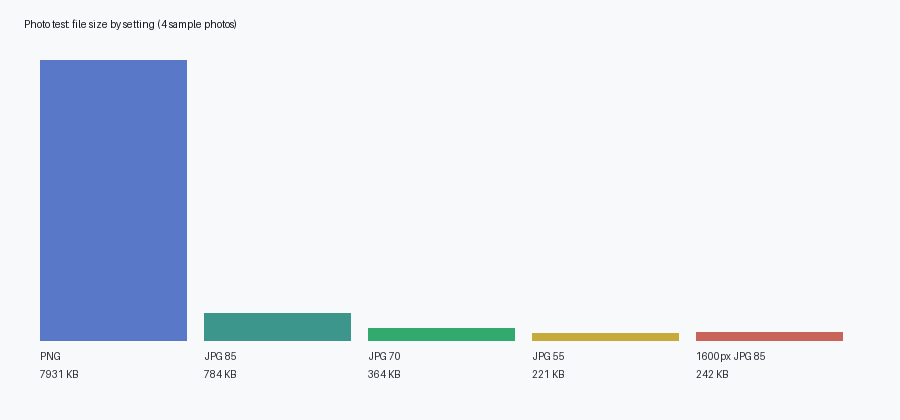
The results make one thing clear: choosing a format matters more than blindly lowering quality.
Photographs respond well to JPEG
Take the 3200×2400 photo-like sample. Its original PNG was 16,917 KB. Exporting it as JPEG at quality 85 brought that down to 1,671 KB. At quality 70, it dropped to 776 KB. At quality 55, it reached 471 KB.
That's a substantial difference without changing the image dimensions. The smaller resolutions followed a similar pattern. An 800×600 photo went from 1,058 KB as PNG to just 105 KB as JPEG at quality 85.
For photographic content, JPEG is often a sensible choice when file size matters.
Flat graphics behave differently
The flat graphic results were almost the opposite. The 3200×2400 PNG was only 27 KB. Converting it to JPEG at quality 85 increased the size to 70 KB. Even quality 55 produced a 64 KB file, still considerably larger than the original PNG.
Flat graphics often contain large areas of similar colors, sharp edges, and simple shapes. PNG handles these patterns efficiently. JPEG introduces compression artifacts around edges and may spend more data representing details that were already stored efficiently.
This is why converting every image to JPEG is not a reliable compression strategy.
Test results
All figures are KB.
| Image | PNG | JPEG 85 | JPEG 70 | JPEG 55 |
|---|---|---|---|---|
| Photo 3200×2400 | 16,917 | 1,671 | 776 | 471 |
| Photo 1600×1200 | 4,231 | 419 | 194 | 118 |
| Photo 800×600 | 1,058 | 105 | 49 | 30 |
| Graphic 3200×2400 | 27 | 70 | 66 | 64 |
| Graphic 1600×1200 | 8 | 27 | 24 | 22 |
What should you actually choose?
For photographs, start with JPEG quality 80–85. If the image is still too large, try quality 70 and inspect the result before going lower.
For logos, icons, screenshots, diagrams, and illustrations, keep PNG unless another format produces a better result.
Resizing can also help. In the test, a 3200×2400 photo resized to 1600 pixels on the longest side and exported as JPEG 85 measured 188 KB, less than a quarter of the full-resolution JPEG 85 output. A photo that does not need its original resolution should not carry thousands of unnecessary pixels.
Pocket PDF provides browser-based image tools for working with image files: https://www.pocketpdf.site.
The useful lesson from this test is not that one format wins. It's that image content determines which compression method makes sense.