Reducing an image from several megabytes to a few hundred kilobytes feels like a complete cleanup.
It isn't necessarily one.
Image compression changes how image data is stored. Metadata is a separate part of the file, and changing the compression quality does not automatically guarantee that metadata has been removed.
We explored the file-size side of this issue using eight synthetic sample images, covering photographic and flat graphic content at four resolutions. The tests used synthetic sample files and local encoding, using the same techniques as browser-side tools. No user data was involved.
Importantly, these tests measured file sizes. They did not measure metadata removal or verify the presence or absence of particular metadata fields.
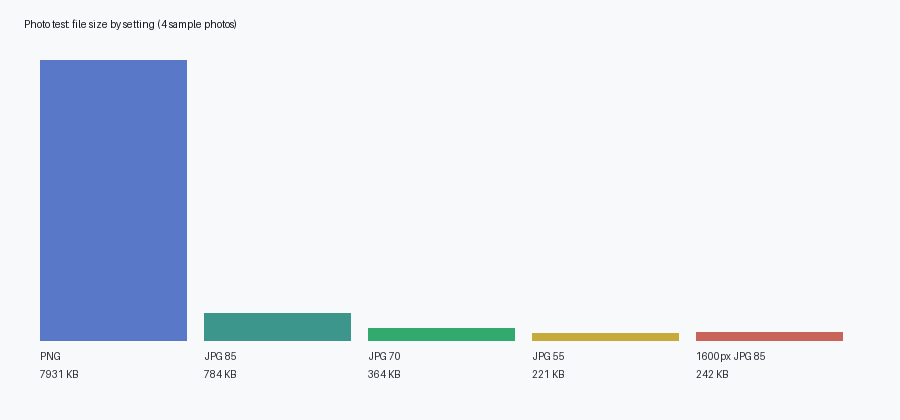
What compression actually changes
Consider the 3200×2400 photo-like sample. Its PNG file measured 16,917 KB. Exporting it as JPEG quality 85 reduced it to 1,671 KB. At quality 55, the output measured 471 KB.
The image became much smaller, but file size alone tells us nothing about whether metadata was retained. Depending on the encoder and export settings, metadata may be preserved, rewritten, or discarded. Some image formats and export workflows handle metadata differently. Even two tools exporting the same image can produce different results.
| Sample | PNG | JPEG 85 | JPEG 55 |
|---|---|---|---|
| Photo 3200×2400 | 16,917 KB | 1,671 KB | 471 KB |
| Photo 2400×1800 | 9,517 KB | 941 KB | 266 KB |
| Photo 1600×1200 | 4,231 KB | 419 KB | 118 KB |
| Photo 800×600 | 1,058 KB | 105 KB | 30 KB |
What compression does NOT necessarily remove
Image files can contain several types of metadata. EXIF information can include camera settings, timestamps, and sometimes GPS coordinates. IPTC information is often used for captions, descriptions, copyright information, and creator details. XMP can contain editing information, descriptions, rights details, and other structured metadata. ICC color profiles describe how colors should be interpreted; removing them without considering the output can affect color appearance.
Compression does not provide a universal guarantee that these fields disappear.
How to approach image cleanup
Start by deciding whether you actually need to remove metadata. For a public product image, you might want to remove unnecessary location or camera information while preserving copyright details. For a photograph that needs accurate color reproduction, removing its color profile without understanding the consequences may create another problem.
Use a metadata inspection tool to check the original and exported files. If metadata removal is required, use an export or sanitization process that explicitly supports it, then inspect the resulting file again.
Don't assume that a smaller file means a cleaner file.
Compression focuses on file size and image quality. Metadata sanitization focuses on information stored alongside the image content. Both can be useful, but they solve different problems.
Pocket PDF provides browser-based file utilities for everyday image and document workflows: https://www.pocketpdf.site.
A useful habit is to check both the visible image and the underlying file properties before publishing something publicly.